Experience: Development
|
|
|
|
Below you will find further information regarding my experience with business solutions and development projects:.

 Visual Basic
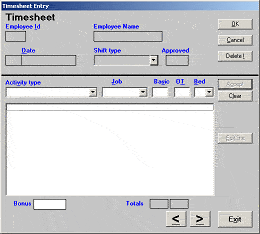
The time costing system used at Biceri was particularly complex where timesheets were multidimensional. This was due to a many-to-many relationship between customer job codes and the actual activity or work performed by the employee on each job. In any given shift period an employee could potentially book work to upto 15 or 20 individual customer jobs. The number of activity types available for selection exceeded 130. Factor into this the fact that work could be booked on basic or overtime and the amount of data that is collected for processing soon escalates out of all proportion.To ease the data entry burden of all this data on the accounts staff the a timesheet database was developed in Microsoft Access with a separate Visual Basic front end application for the use by all employees. Once an employee has validated themselves to the timesheet system they could enter their timesheet from any PC either in the offices, or from a number of "Kiosks" which were available at various points around the shop floor.
Managers used the same front end application to review their departments timesheets and approve the validity of the information.
Each week the accounts department would run Access reports on the information collected, reminder managers where timesheet approval was outstanding and finally export the costings into the corporate accounts system.
The supplier of the accounting system provided the code for the import/export whilst my role was to develop the system ensuring that the front end was user friendly (bearing in mind that all employees of varying computer literacy were required to use it), that the user response times were acceptable even at peak use, and that it was fully functional on a concurrent multi-user basis.
With much of the backend holding key job information the database was later restructured so that the tables were linked into the Engine Test Reporting System eliminating much data redundancy.
The Outlook email message digest parser was developed for a client who had a requirement to take contact data from emails and to add them to the contacts held within the email system.
The emails that arrived were in one of two formats. The first of these (the web enquiry form format) was simply one email per contact where as the second format was that used by the periodical news and discussion group digests. These contained multiple contacts per email.
The second of the format had no constant distinguishing email subject line, as they would typically include a date or a digest number. As there were a number of sources the application had to be flexible to allow a specified subject line, which would then be used as a basis for pattern matching.
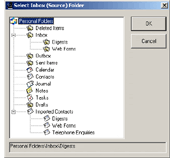
The finished application allows the user to specify the location of the emails to be scanned and the location in which to place the contacts once created.
Summary of features
- Should be able to graphically select the source folder for emails to scan, and also the destination folder in which to place contacts
- Should be able to filter emails for checking by pattern matching text in the subject line
- Should be able to select from a range of common text delimiters either square brackets or double quotes and angle brackets.
- Contacts should not be duplicated if already existing in the system
- For auditing purposes it should be possible to specify a user defined message to be placed in the contacts notes during its creation
- User configurations should be saved and recovered for later sessions
- A user set up program should be provided for ease of installation
- A report should be generated of how many emails were checked, how many contacts were created, as well as any errors such as duplicate contacts
A User manual and sample of the source for this application may be downloaded from this site from the downloads page.
Microsoft C (incl. Real Time controller and monitoring) 
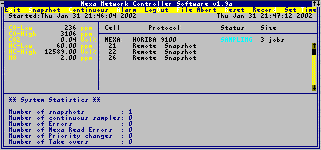
There are many different parameters that need to be monitored and recorded as part of automotive testing. One group of these relate to the emissions given off by the engine and/or its fuel. These readings are typically not required for the entire length of test and sample readings may simply be required every few hours or number of test cycles. This allows for sharing of the emissions reading equipment between several test beds.
An application was developed in Microsoft C to respond to digital inputs either from push button displays or from Digalog Test bed controllers. The PC based program would detect which test bed was requesting an emissions reading and set digital outputs to select the appropriate valves for the hot exhaust line.
After a configurable passage of time to allow enough exhaust gases to travel the hot lines to the Horiba Mexa 9100 Gas Analyser the application would request sample readings and finally an averaging reading. The physical connection between the analyser and the PC was via an IEEE-488 channel. Once the readings had been taken the valves would be shut, the lines purged of gases to prevent contamination of future samples, and provide the data readings to the remote displays via an RS-423 line.
As a result of my work in completing the project performing corrective work, error handling and optimisations the performance of this application went from failing several times a day to never failing.
A fully working protocol was later developed by myself which simplified the design of the system whilst enhancing its features.
This version was written to run under Microsoft Windows and take advantage of the NetAPI inherent in the operating system to use standard PCs rather the Horiba Remote Displays. With the ever increasing number of PCs required at each test bed this was considered excellent use of existing resources.
The other advantage of running under Windows was that the application was written to see NetDDE and so emissions sampling and monitoring could be achieved from any PC available to the network whether on the shop floor or the engineers desk.
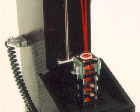
The Biceri Bore Polish Scanner is a precision optical instrument for measuring polish in an engine cylinder bore. It was initially designed for the Daimler Benz OM364A engine (CEC L-42-T-89), however it could effectively be used for
A low power (0.5mW) eye-safe, helium-neon laser is used to scan the engine cylinder measuring the reflectivity of the bore surface.
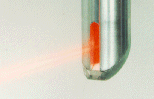
To ensure correct alignment of the scanner tube, the borescanner is designed with two base plates. The scanner assembly is mounted on the upper plate, while the lower plate, which will be specific to each engine type, is located on dowel pins situated appropriate to the original machine of the engine block. The two plates are finally connected together using locating dowels.
A precision optical system of mirrors, beam splitters, and polarising optics directs the light beam onto the cylinder wall and light reflected back along the same path.
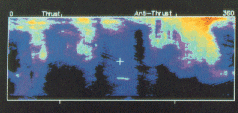
The scanner tube is lowered and rotated into the cylinder, measuring every 0.039 square inches (1 square mm). The position and movement of the measuring tube is controlled by two stepper motors, which are in turn controlled by an IBM compatible PC. The calibration routine is carried out automatically before a series of measurements is started.
When managing network servers one of the first ports of call in troubleshooting should be the event logs. Unfortunately many network administrators do not think about the event log until its too late and the vital information held within it has long gone.
Tools exist in the Windows Resource Kit to export the event logs to text files however in doing so they lose alot of the information by not exporting the binary data. The solution to the problem was to develop the SAVELOG.EXE application.This is a command line application which allows the network administrator to by the use of parameters to save any of the event logs to a given directory, and optionally name the exported file using the current date, or clear the log.
As the application is a command line application I have always used it in a scheduled CMD file so that every day all logs are written to disk should they be required at a later date.
The executable file maybe downloaded from this site via the downloads page.
Microsoft Access 
All Microsoft Access database applications have been developed with the End User in mind and as such all use autoexec macros with custom menus and user friendly forms to eliminate the chance of loss of data integrity.
The time costing system used at Biceri was particularly complex where timesheets were multidimensional. This was due to a many-to-many relationship between customer job codes and the actual activity or work performed by the employee on each job. In any given shift period an employee could potentially book work to upto 15 or 20 individual customer jobs. The number of activity types available for selection exceeded 130. Factor into this the fact that work could be booked on basic or overtime and the amount of data that is collected for processing soon escalates out of all proportion.To ease the data entry burden of all this data on the accounts staff the a timesheet database was developed in Microsoft Access with a separate Visual Basic front end application for the use by all employees. Once an employee has validated themselves to the timesheet system they could enter their timesheet from any PC either in the offices, or from a number of "Kiosks" which were available at various points around the shop floor.
Managers used the same front end application to review their departments timesheets and approve the validity of the information.
Each week the accounts department would run Access reports on the information collected, reminder managers where timesheet approval was outstanding and finally export the costings into the corporate accounts system.
The supplier of the accounting system provided the code for the import/export whilst my role was to develop the system ensuring that the front end was user friendly (bearing in mind that all employees of varying computer literacy were required to use it), that the user response times were acceptable even at peak use, and that it was fully functional on a concurrent multi-user basis.
With much of the backend holding key job information the database was later restructured so that the tables were linked into the Engine Test Reporting System eliminating much data redundancy.
As with all my database systems this was written with the end user in mind (in this case the Finance Director) and as such was a complete Access system with custom menus and an import routine to pull the database from the CD which was sent to him every month by the telephone provider.
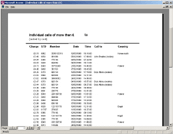
Produced reports including calls longer than 20mins, regular calls to unknown people, individual calls more than £1, out of office hours and costs and durations by cost/duration.
Managed to signifianctly reduce the monthly phone costs by spotting overe zealest use of 192 and introduce a network copy of Kellys Business directory and make users aware of BT On-line directories, reduce the cost of long personal calls made during the night shifts, and use the calling patterns to re-negotiate better call charges with our telephone provider.
Although the system was initially viewed as draconian was well recieved by all staff once the benefits were seen by the staff, especially the on-call engineers who sudden could provide details of when and for how long they were called for, and also to show which shift teams tended to have more calls and thus require proactive training.
This was a system which benefited staff and company alike.
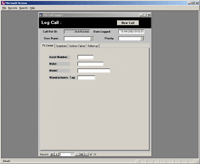
Whilst at FormScape I developed an Internal Support Call logging system in Microsoft Access. This provided the facility to check who were making the most calls and for what reasons, enabling the IT team to identify problems with either the systems as they stood, or lack of provision for education of its internal customers.
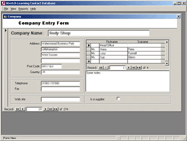
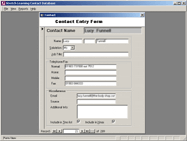
Many contact management applications use either a contact or business centric access method. I was asked to produce a contact management database system which would work in either mode using the same front end. The application had to allow easy movement through the records in either mode, allow for searches, and for a number of business specific reports to be produced.
The front end was designed such that if input focus was set to one of the companies contacts then selecting Contact from the View menu would switch the application into "Contact-centric" mode with the previously selected contact being the contact record presented. The user could then search and perform their work in this mode, before switching back into Company-centric mode at which point the company record presented would change to that of currently selected contact.
The completed Microsoft Access database covered these requirements as well as providing for ease of address informaton by providing an automatic lookup and address completion based on the entered postcode.
This Report Generator System had been attempted as a solution at BICERI on a number of different occasions. The most successful that being a system that ran on a Perkin-Elmer mini computer in the 1980s. This system was designed specifically for the needs of a single large OEM customer. With the move to the Lubricant and Fuels market in the late 1980s, together with the introduction of the "cheap" IBM PC, an alternative was required for these changes.
The Report Generator Application was designed with the following business objectives in mind:
- To de-skill the job of report production. This enabled the engineers to be do what they were supposed to be doing i.e. engineering. It also permitted the spreading of work load as a report could easy be produced by anyone and only required the engineer for final approval.
- To produce consistent documentation. Reports were visually inconsistent between engineers and even a single engineers reports in the early days as there were no common application usage with engineers using whichever package they had become used to using.
- To reduce errors in reports. As each engineer has developed his own spreadsheets and macros to produce a report errors have arisen due to the lack of information when it is necessary for someone to produce a report (e.g. where macros don't quite work properly or need a special set up prior to running) .
- To provide information to those who require it. Biceri made a living not by running engines but by producing information. This information is frequently lacking in areas of the company where was needed. For example the Sales team did not have access to any statistical data arising from tests as there was no central repository of data.
- To meet the objectives as defined in the Quality procedures. Reports did not meet NAMAS standards: no issue number and issue date on every page, rating methods not defined to a standard, no calibration dates for test equipment etc. With a vast array of report "templates" amending each and every one would have been an monumental task.
A cut down version of the "User Manual" for this system is available for download from this site. As the hub of the systems that ran on the BICERI office and test facilities networks more information will be posted regarding this system shortly. Other systems that communicated the Report Generator System included the timesheet database entry, the Emissions Queuing System, and the Digalog Test Bed Controllers.
Microsoft Office Suite 
The Report Generator Application was designed with the following business objectives in mind:
- To de-skill the job of report production. This enabled the engineers to be do what they were supposed to be doing i.e. engineering. It also permitted the spreading of work load as a report could easy be produced by anyone and only required the engineer for final approval.
- To produce consistent documentation. Reports were visually inconsistent between engineers and even a single engineers reports in the early days as there were no common application usage with engineers using whichever package they had become used to using.
- To reduce errors in reports. As each engineer has developed his own spreadsheets and macros to produce a report errors have arisen due to the lack of information when it is necessary for someone to produce a report (e.g. where macros don't quite work properly or need a special set up prior to running) .
- To provide information to those who require it. Biceri made a living not by running engines but by producing information. This information is frequently lacking in areas of the company where was needed. For example the Sales team did not have access to any statistical data arising from tests as there was no central repository of data.
- To meet the objectives as defined in the Quality procedures. Reports did not meet NAMAS standards: no issue number and issue date on every page, rating methods not defined to a standard, no calibration dates for test equipment etc. With a vast array of report "templates" amending each and every one would have been an monumental task.
A cut down version of the "User Manual" for this system is available for download from this site. As the hub of the systems that ran on the BICERI office and test facilities networks more information will be posted regarding this system shortly. Other systems that communicated the Report Generator System included the timesheet database entry, the Emissions Queuing System, and the Digalog Test Bed Controllers.
polyForth (Real Time)
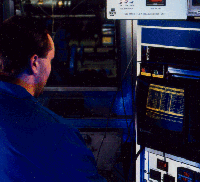
During my time at Biceri Ltd part of my role included supporting the software development for the Digalog Cellmate CM2's. The Cellmate is an Intel processor based computerised control and data acquisition system for controlling engine and rolling road test stands. It is able to simulate, in real time, changing road load conditions applied to vehicles. It also collects and reports on the data collected from the sensors connected to the test items.192 analogue inputs, 24 analogue outputs, 64 digital input/outputs and 3 digital counter timers ( DCTs ) are standard
The programming of these is performed by writing Forth code and calling the underlying operating system which was a version of PolyForth. Toolbox was Digalogs base code, in Forth, that sat on top of the PolyForth nucleus and provided the API for the systems.
The systems were networked together using Cat.5 at the physical layer and TCP/IP as the transport protocol. All the Digalog systems were networked in this way to the office network via a Compaq Server acting as the file-server and router between the two networks. They were also networked to a standalone PC to allow emissions readings to be taken. More information on this system can be found elsewhere on this site.
Microsoft BASIC (incl. Real time)
The Ford Tornado combustion engine is a six cylinder diesel engine. With a correctly running engine the pressure measured should be equally balanced, however as fuel injectors fail the pressure drops.
I was responsible for developing this PC based application which used an AIM ComputerScope ISA card installed in a PC which was capable at sampling the channels at upto 1MHz. The card was programmed from the PC to trigger at TDC (top dead centre) and to sample the fuel lines at 2 degrees per revolution using a shaft encoder mounted on the drive shaft of the engine.
A small IRQ assembler routine was built into the application to set a BASIC variable so let the software know when the data had been placed into the BASIC variable array. The program would then display the fuel line pressures in a graphical format on the screen adjusting the start point of each graph so that the combustion appeared at the point on the x-axis so that a visual comparsion could be made.
Although orginally designed specifically for the Ford Tornado engine, the application was further developed to support a engine with upto 8 cylinders, with any given firing order and variable number of samples per degree on the shaft encoder.
As a performance comparison the application I also ported the source code to Microsoft C, however as the only C programmer in the company at that time it was felt that commericially the released product should stay in Microsoft BASIC to allow a wider support base.
BICCAS was a combustion analysis package for both gasoline and diesel based engines which analysised data collected using the AIM ComputerScope board (a full length ISA card capable of collecting upto 16 input channels at a sampling rate of upto 1MHz).
The package comprised of 4 modules.
BICCAS 1 - Basic graph plotting and presentation package
BICCAS 2 - Analysis package which produced Mass Fraction Burnt, I.M.E.P., polytropic index, etc charts per captured engine revolution
BICCAS 3 - Tabular and graphical statistical analysis over unlimited engine revolutions
BICCAS 4 - Analysis package for Diesel engines
The Biceri Universal Wear Machine is a versatile tool for evaluating the wear and friction characteristics of materials, surface finishes, treatments and lubricants. It is suitable for testing materials, ceramics, plastics, dry lubricant coatings, surface hardening coatings, lubricants and additive packs. The standards machine is a Pin-on-disc unit, however other modules allow operation in a Pin-on-Reciprocating plate or block-on-ring mode. The speed, load, and temperature can be controlled independently, enabling a wide range of operating conditions to be studied.
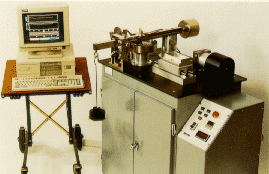
The unit comprises a cabinet fitted with top module mounting plate and a variable speed drive system mounted within. The standard Pin-on-disc shaft assembly transmits motive power for all three modes of operation. With each mode facilitated by the addition of an appropriate module located on the top plate. A dead weight load arm is used to load test samples, and a force post assembly measures wear and friction coefficient.
Wear and friction is measured with two transducers whose output is plotted directly on a suitable recorder or collected on the computer system. Software is available for the data collection and enhanced presentation.
Microsoft Excel 
Reporting is a common requirement however reporting for the sake of it is a waste of resources (remember that data is meaningless until it is converted into information).
What percentage of your systems resources are being utilised?.... and more importantly when will they be exhausted? Will you know before this occurs?
I have developed several automated systems using the Microsoft Office suite to collect various pieces of data from disparate systems on multiple servers and at the single click of a button. These produce "Management Ready" reports on network utilisation and performance. Further more the historical data is analysed in the process and used to proactively predict when the measured resources would be exhausted there by keeping the systems running on a 24x7 basis and keeping fire fighting to a minimum.